

Migrating to Odoo from SAP, Oracle or Sage
Migrating off a legacy ERP is rarely about technology. It is about untangling years of accumulated customisation, data and habits. This post is the playbook our consultants use when a client asks us to take them off SAP, Oracle, JD Edwards or Sage and onto Odoo.
Legacy ERP migrations have a reputation for going wrong, and that reputation is partly deserved. Most failures are not technical — they are decisions made too late, scopes that grew without governance, or data nobody owned. The technology side is solvable; the human side is the one that needs the strongest project.
The routes into Odoo are well travelled: manufacturers coming off SAP Business One, distributors off SAP S/4 satellites, services firms off Oracle E-Business Suite, retailers off JD Edwards, and a long tail of SMEs off Sage 100, Sage X3 and Microsoft Dynamics NAV. The patterns repeat.
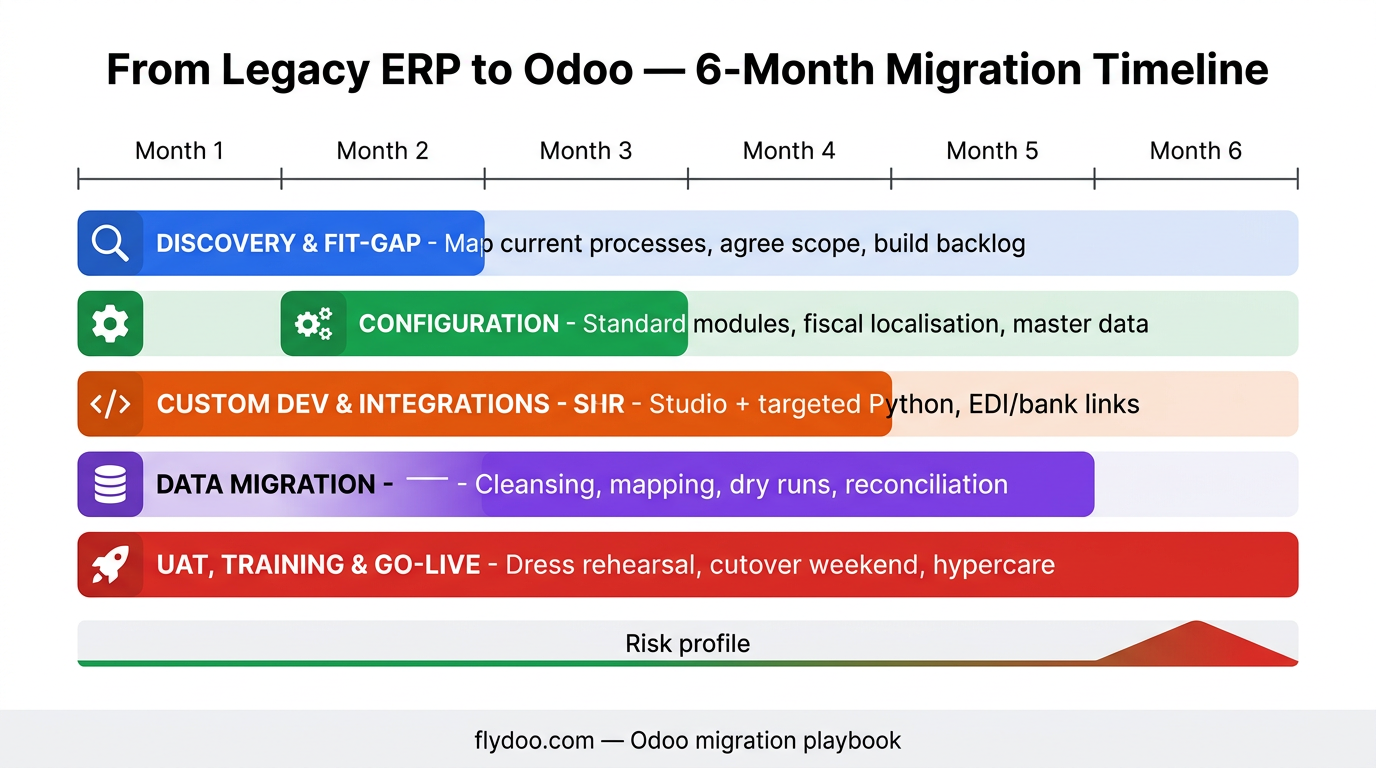
What follows is the order in which we walk a migration. Not every client needs every step, but skipping the early ones is what kills go-live nights — and reputations.
Start with the why, not the how
The first conversation is never about Odoo. It is about why the current ERP no longer fits and what success looks like in two years. That picture drives everything that follows: scope, sequencing, training, even partner selection.
Teams that can articulate the why crisply tend to hold their timeline. Teams that cannot are the ones that descope halfway through, after spending serious money on the parts they then drop. We push hard on this conversation upfront.
- Document the top three reasons for migrating
- Define the two-year target operating model
- Agree on what is explicitly out of scope
- Name an executive sponsor who owns the outcome
- Decide which legacy reports must survive verbatim and which can evolve
Map what you actually use
Most legacy ERPs are 80% configured, 20% used. Before scoping anything in Odoo we run a discovery to map what is actively used, by whom, and how often. The answers are usually surprising — and they shrink the migration scope dramatically.
A discovery on its own can take whole modules out of scope. It is common to find licences and maintenance still being paid for screens nobody has opened in two years. Saving that cost is sometimes how the migration funds itself.
- Inventory active modules, screens, reports and integrations
- Survey end users to separate 'used daily' from 'used yearly'
- Identify customisations that exist for historical reasons only
- Decide what to drop, what to redesign, what to rebuild
- Publish the discovery findings — visible decisions stick better
Data migration: the long pole
On migration projects, data work is almost always the longest activity. It is also where most quality issues come from. Treat it as a first-class workstream with its own lead, its own plan and its own quality gates.
Budget 30–40% of the project effort for data. Underestimating that budget is how teams end up with broken openings on day three of the new system, with finance staring at imbalanced trial balances.
- Decide the cut-over date for transactional data per stream
- Migrate master data first; transactional data second
- Run iterative loads with quality reports
- Rehearse cut-over twice before the real one
- Keep a read-only snapshot of the legacy system after sunset
Coexistence and parallel run
On larger programmes Odoo and the legacy ERP need to coexist for some weeks or months. We design coexistence with clear rules: which system is the source of truth for what, how data flows between them, and when the legacy system is finally turned off. Without those rules both systems drift.
Parallel run is expensive — your team operates two ERPs at once. Keep it as short as the data quality allows. We aim for two to four weeks of parallel run on critical processes, not three months.
- Per data domain, name the system of record
- Build minimal, reliable bidirectional flows where needed
- Plan a hard sunset date for the legacy ERP
- Limit parallel run to weeks, not months
- Snapshot the legacy data at sunset for audit and history
People, training and change
Technology migrations fail on people, not on code. The teams who survive the cutover have invested in training, in internal champions, and in honest communication about what will be different on day one. Skipping any of these is the fastest way to a bad month two.
We always identify a champion per business function before training even starts. They are the ones who will answer the small questions in the first weeks, faster than any helpdesk ticket. Without them every micro-question turns into an escalation.
- Identify and name champions per business function
- Train on real scenarios, not on demo data
- Communicate transparently — including what will be harder at first
- Plan visible support for the first two weeks after go-live
- Run a retrospective at month one and again at month three
The mistakes that sink legacy ERP migrations
Five patterns worth naming out loud before they get the chance to happen.
- Letting scope grow without an executive sponsor pushing back.
- Treating data migration as an IT chore instead of a workstream.
- Trying to replicate every legacy customisation in Odoo on day one.
- Running parallel for months instead of weeks — exhausts the team.
- Going live without identified champions in each business function.
How to measure that the migration succeeded
These are the numbers we track for three months after go-live.
- Open tickets per active user — should trend down each week.
- Process completion times on the top 5 flows — back to baseline within month two.
- Data quality score on master data — should rise versus the legacy baseline.
- Finance trial balance reconciles to the cent versus legacy at month-end.
- User satisfaction (light pulse survey) trending positive by month three.
How we run legacy migrations at Flydoo
We never skip discovery, even when the client says 'we know what we want'. Two weeks of structured discovery on a real ERP migration saves months later. We map processes, data, integrations and reports; we publish what we find; we make scope decisions visible.
We then build the new Odoo iteratively: a small slice goes live early so the team starts learning, and the bigger modules follow. Big-bang go-lives are reserved for cases where coexistence is impossible — usually because of regulated reporting boundaries.
- Two weeks of structured discovery before any configuration
- Publish discovery findings and scope decisions visibly
- Iterative go-lives where business reality allows
- Champions in every function before training starts
- Two cut-over rehearsals minimum, with timing measured
Migration readiness checklist
Walk this list before you commit to a cutover date.
- Top three migration drivers documented and signed by executive sponsor
- Two-year target operating model agreed and communicated
- Discovery completed and shared with all stakeholders
- Data migration plan with quality gates and rehearsal dates
- Champions identified and trained per business function
- Parallel run scope and duration agreed
- Sunset date for legacy ERP planned and budgeted
Migrations are projects, not events
A successful migration off SAP, Oracle or Sage is the result of a structured project, not a one-week heroic. The technology side of Odoo is in good shape — the teams that succeed put their effort into scoping, data and people, in that order.
Pick a partner who has done this work before, who will push back when scope drifts, and who will say 'no' when you ask for the wrong thing. The right migration is the one your team is still proud of three years later.
If you are weighing a migration off a legacy ERP, we are happy to walk you through the discovery and scoping options before you commit to anything bigger.
Frequently asked questions
How long does a typical migration from SAP or Oracle to Odoo take?
For an SME (50–200 users) we typically plan 6–9 months from kickoff to go-live, including discovery, build, data migration, training and cutover. For larger or more regulated organisations 9–18 months is realistic. Anything shorter than 6 months on a real legacy migration is either tiny or rushed.
Can we migrate one module at a time, or does it have to be big-bang?
Where business reality allows, we strongly prefer iterative go-lives — start with a contained module (often CRM or HR), then add the next slice. Big-bang is sometimes unavoidable for accounting or for regulated reporting, but it is rarely our first choice.
How much historical data should we migrate?
Less than you think. Open transactions and the last full fiscal year of closed data is a typical baseline. Older data goes to a read-only snapshot of the legacy system. Migrating ten years of history is rarely worth the effort and the data quality risk.
Will Odoo handle the same level of customisation we have today?
Probably yes — but you should ask whether you still need that level of customisation. Most legacy ERPs accumulate customisations that exist for historical reasons. The migration is your opportunity to reset to a leaner configuration. Resist the urge to copy the past.
How do we handle the legacy system after sunset?
Keep a read-only snapshot for audit, history queries and any tax authority requests. Do not keep it live with users — that recreates the dual-system problem. We typically deliver the snapshot as a frozen environment with documented retention and decommission dates.
Want to discuss what this means for your own Odoo project? We're happy to talk.