

Odoo deployment options: Online, Odoo.sh, or self-hosted
Where you run Odoo shapes daily life for your IT team, your developers and your finance director. Odoo ships three deployment models — Odoo Online, Odoo.sh and self-hosted — and each one wins for a different kind of company.
There is no universally right answer here. The right choice depends on your team's appetite for operations, your customisation depth, your data residency rules, and how predictable you want the bill to be.
We will walk through the three options, the trade-offs that matter in practice, the mistakes we see most often, and how we help clients pick the model that will still feel right two years in. The honest version, not the brochure version.
If you are sizing this decision for the first time, expect to revisit it. Companies grow into and out of deployment models, and switching is doable — but never as cheap as choosing well at the start.
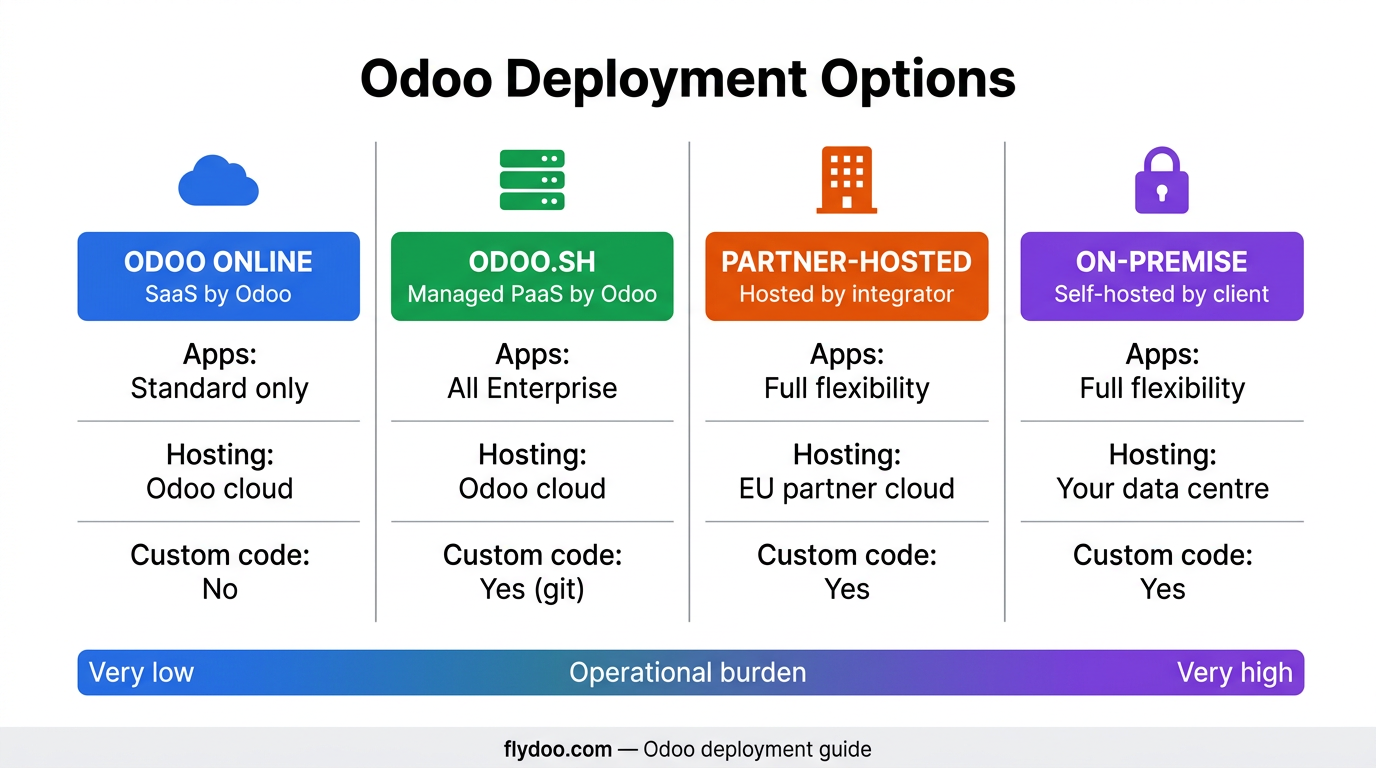
Odoo Online — fastest path, narrowest extension
Odoo Online is the SaaS option run by Odoo S.A. It is the fastest way to start and the simplest to operate: no servers, no patches, no DevOps. The trade-off is real but bounded: no custom code, no SSH, limited integration depth.
We recommend Odoo Online when the client wants standard Odoo, full stop. SMEs in services, retail and light manufacturing thrive here. Customers with strong custom module needs should not pick Online — they will hit the wall within a year.
- Hosted by Odoo, zero infrastructure for the customer
- Patches and upgrades managed by Odoo on a fixed cadence
- No custom Python modules — only Studio and standard apps
- Solid SLA and security baseline out of the box
- Best fit: SMEs running standard Odoo without bespoke modules
Odoo.sh — managed platform with custom code
Odoo.sh is the platform-as-a-service offering: managed infrastructure, but you keep the ability to ship custom modules. Built-in branches, staging environments, automatic backups, and a clean Git workflow that any modern team appreciates.
This is our default recommendation for mid-market customers with a few custom modules and a partner doing the engineering. The cost-per-feature is the lowest of the three options, and the operational burden stays manageable.
- Managed infrastructure with custom Python modules supported
- Branches, staging and prod environments out of the box
- Automatic backups and one-click restores
- Tight Git workflow — code review and CI baked in
- Best fit: mid-market customers with a partner shipping custom code
Self-hosted — total control, total responsibility
Self-hosted means you run Odoo on your own infrastructure: your servers, your patching, your monitoring, your backups. You get total control — over the OS, the database, the network, the data residency — and you take total responsibility for keeping it healthy.
Self-hosted is the right answer for clients with strong data residency rules, very heavy customisation, or an existing internal Ops team that already runs serious workloads. It is the wrong answer for an SME without a serious DevOps capacity.
- Full control of infrastructure, OS, database and network
- Any custom module, any integration, any version policy
- Total responsibility for backups, patches and security
- Data residency anywhere you want it
- Best fit: large customers with strong Ops or strict residency
Cost — predictable, variable and hidden
Each model has a different cost shape. Online is the most predictable: per user per month, almost no surprises. Odoo.sh is predictable but scales with workers and storage. Self-hosted has the lowest licensing cost and the highest operational cost — including the salaries of the people who run it.
We model total cost of ownership over three years before any client picks. The 'cheapest' option on a one-year view is rarely the cheapest on a three-year view. Self-hosted in particular looks attractive on year one and expensive on year two when the Ops bill arrives.
- Online — fully predictable, scales linearly with users
- Odoo.sh — predictable subscription plus workers and storage
- Self-hosted — low licence, high Ops; needs honest TCO modelling
- All three — LLM and integration costs are extra in 19.x
- Reserve budget for upgrades — annual on Online, planned on the others
How to pick — the questions we ask first
We never recommend a deployment model from a brochure. We ask seven questions, in this order, and the answers usually narrow the choice to one or two options.
If a client cannot answer these questions yet, the deployment decision is premature. We pause, get the answers, then revisit. A wrong call here is expensive to reverse.
- Do you need custom Python modules now or within 12 months?
- Do you have any specific data residency rules?
- Does your team have real DevOps capacity to operate Odoo?
- How predictable does the monthly bill need to be?
- How critical is your upgrade autonomy versus Odoo's cadence?
Deployment-choice mistakes that keep coming back
Five patterns that turn a fine deployment model into a poor fit.
- Choosing Online and then trying to shoehorn custom modules through workarounds.
- Choosing self-hosted with no real Ops capacity — the system slowly degrades.
- Picking based on year-one cost instead of three-year TCO.
- Underestimating the LLM and integration spend on top of Odoo licences.
- Ignoring upgrade cadence — Online ships often, self-hosted ships when you ship.
Metrics that show your deployment is healthy
Whatever model you pick, watch these monthly.
- Uptime over rolling 30 days — at or above 99.9% is the target.
- Restore success rate from latest backup — must be 100%.
- Patch lag — days between patch availability and application.
- Total cost per active user trend — flat or down over time.
- Mean time to recover from incidents — minutes, not hours.
How we run deployment decisions at Flydoo
We run a half-day deployment workshop with the client's IT, finance and operations leads. We walk the seven questions, model the three-year TCO for the two most likely options, and write a one-page recommendation with reasoning. The client signs off the model before we start the build.
We then revisit the decision after a year of operation. Sometimes growth or new compliance requirements move the right answer. Switching deployment models is a project — doable, but planned, never improvised.
- Half-day workshop with IT, finance and ops to walk the seven questions
- Three-year TCO model for the two most likely options
- One-page recommendation with explicit reasoning
- Annual review of the deployment fit after go-live
- Migration plan ready in case the right answer shifts
Practical checklist before locking the deployment model
Tick most of these and your decision will hold up over time.
- Custom module roadmap for the next 12 months agreed
- Data residency rules verified with legal and compliance
- Internal Ops capacity assessed honestly
- Three-year TCO modelled for the top two options
- Backup and restore SLAs documented and accepted
- Upgrade cadence and ownership defined per model
- Migration path between models documented in case requirements shift
Pick the model that fits the company you will be in two years
There is no best deployment model — only the best fit for your situation today and in two years. Online wins on simplicity. Odoo.sh wins on cost-per-feature with custom code. Self-hosted wins on control and residency.
Whichever you pick, write down why. When growth or regulation pushes you to revisit the decision, the reasoning makes the conversation faster and the migration shorter.
If you want a structured second opinion before you commit, we are happy to walk the workshop with your team and give you the one-page recommendation.
Frequently asked questions
Which deployment model is cheapest?
On year one, Odoo Online is usually cheapest. Over three years it depends on customisation depth and Ops capacity — Odoo.sh is often the best cost-per-feature for mid-market, and self-hosted can win for very large organisations with existing Ops. Always model TCO before deciding.
Can I migrate from Online to Odoo.sh later?
Yes. Migrating from Online to Odoo.sh is a well-trodden path — companies take it when their custom needs outgrow Online — and the sticking points are consistent enough to plan for. Plan for a few weeks of project work: it is not a click, but it is not heroic either.
Where is my data hosted on Online and on Odoo.sh?
Odoo runs regions in EU and US (and a few others). You can request EU hosting at sign-up. For strict residency rules — only this country, only this provider — self-hosted is usually the only option that satisfies the auditor.
Who is responsible for backups and security on each model?
On Online and Odoo.sh, Odoo manages backups, patches and platform security; you manage user access and your custom code (Odoo.sh only). Self-hosted, you own everything: backups, patches, network security, monitoring, incident response. Treat this responsibility as a real workstream.
How do upgrades differ between models?
Online upgrades on Odoo's cadence — predictable but not always the moment you would have chosen. Odoo.sh upgrades when you trigger them, with managed tooling. Self-hosted upgrades when you ship — full autonomy, full responsibility. The autonomy is real, and so is the cost of skipping versions.
Want to discuss what this means for your own Odoo project? We're happy to talk.