

Odoo go-live readiness — the 30-day countdown
Go-live is the moment everyone remembers — for the right or the wrong reasons. The difference is rarely luck. The calm go-lives all share a 30-day countdown that verifies what could go wrong before it does.
An Odoo go-live is not a deployment. It is a business event. People will use the new system on Monday morning. If it does not work, sales stops, invoices stop, warehouses stop. The countdown exists to make sure that Monday morning is boring.
We treat the 30 days before go-live as their own project phase, with daily standups, an explicit risk register and a clear no-go criteria list. The phase is short, high stakes, and high reward.
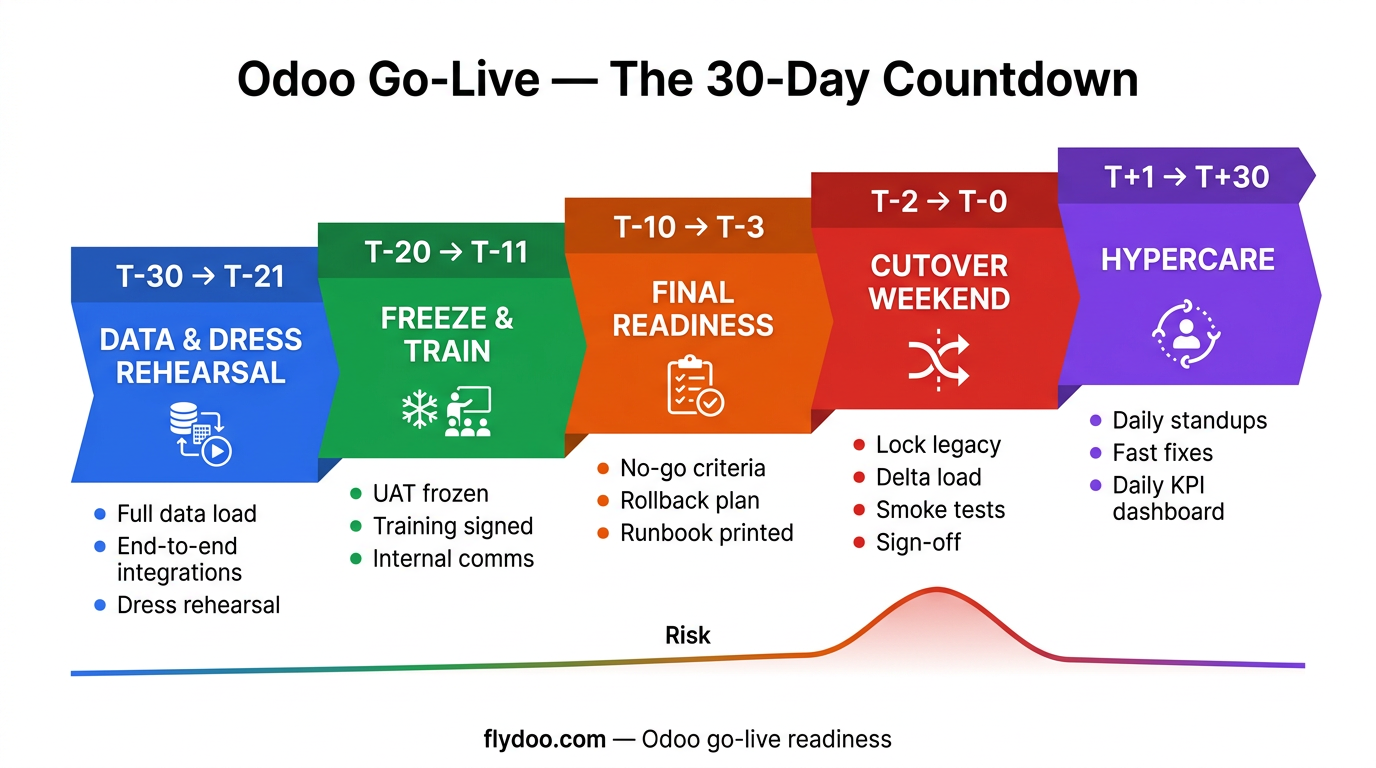
Below is the 30-day countdown we run with clients, the categories of checks it covers, and the no-go criteria that keep a cutover weekend from turning into a bad one.
T-30 to T-21 — data, integrations, and dress rehearsal
Three weeks out, the focus is data and integrations. Run a full data load from the legacy system into a clone of production. Reconcile counts and balances. Test every integration end to end with realistic volumes. Run a dress rehearsal of go-live cutover with the full team.
- Full data load into production clone — reconciled
- Every integration tested end to end with realistic volumes
- Dress rehearsal of cutover script with the full team
- Performance test under realistic load
- Backup and restore tested at least once
T-20 to T-11 — UAT freeze, training, comms
Two weeks out, UAT must be frozen. New issues from this point are go-live blockers, not training topics. End users finish training and sign attendance. Internal comms reach the entire company — what changes Monday, what to do if something breaks.
- UAT frozen — new issues are blockers, not training
- End-user training completed and attendance signed
- Internal comms sent to the entire company
- Customer / supplier comms sent if anything visible changes
- Hypercare team and on-call rota confirmed
T-10 to T-3 — final checks and readiness review
One week out, run the final readiness review with the steering committee. Walk the no-go criteria one by one. Confirm rollback plan. Print the cutover runbook. Brief the support team on the first week. Sleep early the night before.
- Final readiness review with steering committee
- No-go criteria walked one by one — all green
- Rollback plan tested and documented
- Cutover runbook printed and distributed
- Support team briefed on first-week patterns
T-2 to T-0 — cutover weekend
The cutover weekend is execution. Lock the legacy system. Final delta data load. Smoke tests in the new system. Sign-off from each business owner. Open the doors Monday morning with the whole hypercare team on site or on call.
- Legacy system locked at agreed time
- Delta data load completed and reconciled
- Smoke tests run in production
- Business owners sign cutover acceptance
- Hypercare team in place Monday morning
T+1 to T+30 — hypercare, not maintenance
The first 30 days post go-live are hypercare. Daily standups, explicit prioritisation of issues, fast turn-around for fixes, daily dashboard for the steering committee. Hypercare ends when the business says it ends — not on a fixed date.
- Daily hypercare standups for at least two weeks
- Issue triage with explicit priority and SLA
- Fast turn-around for fixes — production is not steady state yet
- Daily dashboard for steering committee
- Formal hypercare exit when business confirms
Go-live mistakes that turn Monday into a war room
Five recurring patterns that turn a manageable go-live into a rescue operation.
- Skipping the dress rehearsal because everyone was tired.
- Not freezing UAT — new requirements arriving in the final week.
- Underestimating data reconciliation time on cutover weekend.
- No rollback plan — and then needing one.
- Treating hypercare as a one-week formality instead of the most important phase.
How to measure that the go-live went well
Five numbers and signals to track in the first 30 days.
- Critical incidents in week 1 — target zero.
- Sales / invoices processed on day 1 vs target — within 90%.
- User support tickets per day trending downward.
- Reconciliation breaks closed within 24 hours.
- Sponsor and end-user satisfaction score by week 4.
How we run go-live readiness at Flydoo
We treat the 30-day countdown as a sub-project with its own backlog, daily standups, and a no-go criteria list that the sponsor can veto on. We would rather delay one week than push a go-live that is not ready.
Our hypercare team is on site or on a dedicated channel for the first two weeks. We measure daily and adapt fast. The steering committee gets a one-page status every morning until the business confirms steady state.
- 30-day countdown as its own sub-project
- Daily standups with explicit no-go criteria list
- Sponsor veto on go-live if criteria not met
- Hypercare on site or on dedicated channel for two weeks
- Daily one-page status to steering committee
Go-live readiness master checklist
Walk this list weekly during the 30-day countdown.
- Full data load into production clone reconciled
- Every integration end to end tested
- Dress rehearsal of cutover completed
- UAT frozen and training signed
- Rollback plan tested and documented
- Comms sent to entire company and to clients if needed
- Hypercare team and on-call rota in place
Boring go-lives are the best go-lives
The best go-live story is the one where nothing happens. Sales sells, the warehouse ships, finance invoices, payroll runs. Everyone goes home on time.
Boring go-lives are the result of disciplined 30-day countdowns, dress rehearsals, frozen UAT, tested rollback plans and proper hypercare. The discipline is the gift you give your future self on Monday morning.
If you are 30 days from a go-live and want a second pair of eyes on your countdown, we are happy to walk through the no-go criteria with you.
Frequently asked questions
How long should hypercare last?
Two weeks at minimum, often four. Hypercare ends when the business says it ends — usually when daily issue volume drops to a manageable steady state. Setting a fixed end date in advance is a recipe for early withdrawal of support, which clients always feel.
Do we really need a dress rehearsal?
Yes. Cutover weekends that skip a full dress rehearsal are the ones with surprises; the rehearsed ones are boring, which is exactly what you want. The rehearsal costs one weekend of the team's time and saves the actual cutover weekend from being a war room.
What is the rollback plan, exactly?
A documented procedure to revert to the legacy system if go-live cannot proceed safely. It includes who decides, by when, how data captured in the new system in flight gets reconciled back, and how the comms reach users. Most rollback plans are never executed — but having one changes the risk calculus on cutover weekend.
Should we go live on a Monday or a weekend?
Cutover happens on the weekend so users open Monday on the new system. Some clients prefer a long weekend (Friday cutover, Tuesday open) for extra buffer; others use a normal weekend. The bigger the data delta, the more buffer you want.
What is the sponsor's role on cutover weekend?
Available, decisive, and physically or virtually present at sign-off moments. The sponsor does not run the technical work but signs the business acceptance gates: data reconciled, smoke tests passed, ready to open. Without sponsor presence, cutover decisions stall in the wrong moments.
Want to discuss what this means for your own Odoo project? We're happy to talk.