

What's new in Odoo 19.2 — the consultant's view
Odoo 19.2 is a maturity release rather than a fireworks display. Having run it on internal systems and test databases, we have sorted the change log into what moves the needle in real client work — and what is mostly noise on a slide deck.
Every six months Odoo ships a wave of changes. Some land on press headlines, most do not. We have lived inside 19.2 since the first release candidate, on our own instance and on sandboxes exercising the accounting, manufacturing, services and retail modules.
This post is not the changelog — Odoo's release notes do that job. It is the consultant filter: which 19.2 changes will an operations or finance director feel within the first month, and which ones can wait.
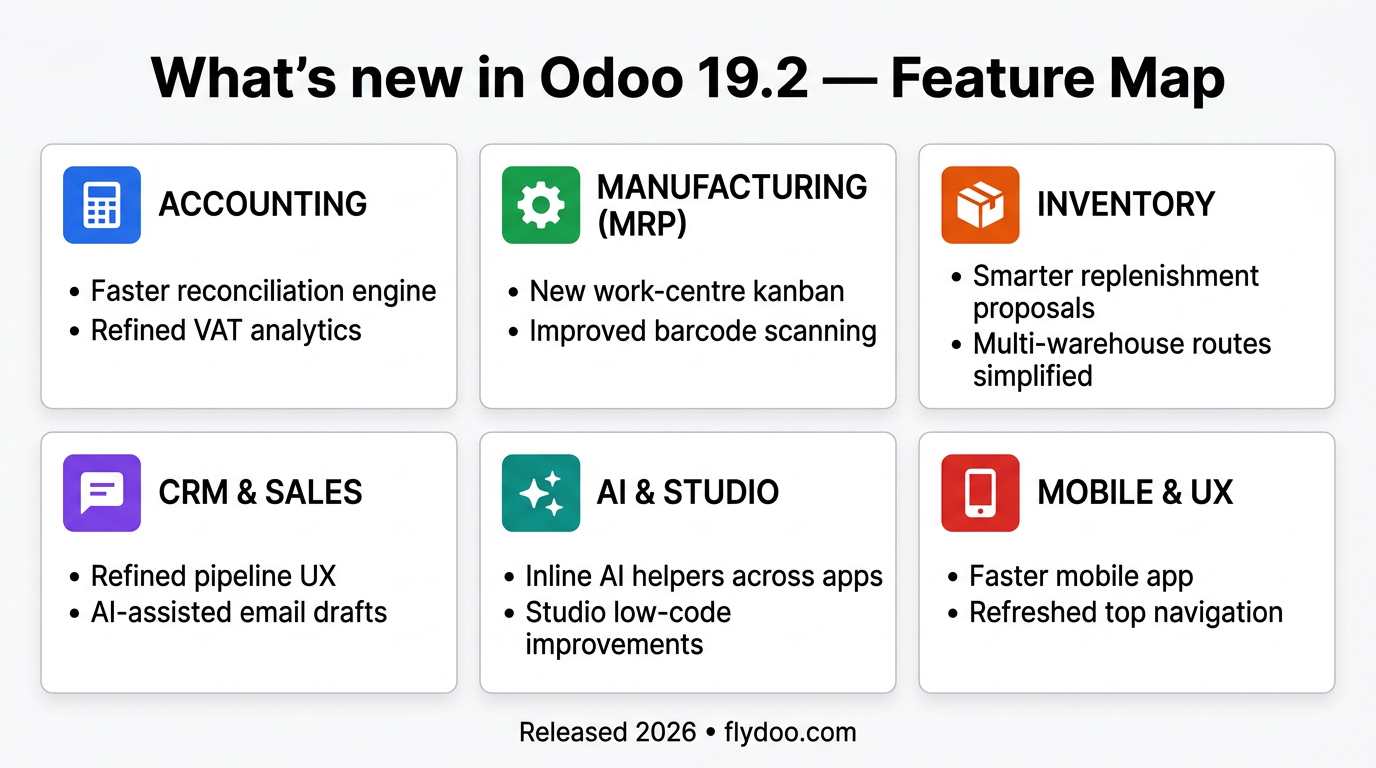
Headlines first: performance is genuinely better, accounting received serious polish, AI features are no longer toys, and the platform surface (REST, webhooks, Studio) keeps closing the gap with what integrators have been asking for.
Performance and ergonomics — the quietly useful upgrade
We tested this on our own database with heavy sales-order volumes. List views with thousands of lines feel snappier, modal dialogs respond more cleanly to keyboard navigation, and the mobile web client is finally smooth enough for outside sales use.
These are the changes end users notice on day one. They will not make a CFO sign a renewal, but they reduce the low-level friction that generates training complaints. After three releases of incremental work, the web client now feels closer to a modern SaaS than to legacy ERP.
- Faster list rendering on tables with many lines (sales orders, ageing balances)
- Search and filter inputs feel snappier on heavy databases
- Modal dialogs reworked for keyboard navigation — power users save hours
- Mobile web client is meaningfully smoother on real-world devices
- Several long-running background jobs run noticeably faster on Odoo.sh
Accounting and finance — boring done well
Accounting in 19.2 receives the kind of update finance teams actually want: clearer multi-currency revaluation, smarter bank reconciliation suggestions, more granular period closing, and European localisation packs aligned with 2026 tax changes.
Bank reconciliation is where the accounting work in 19.2 shows up fastest in day-to-day use. The reconciliation engine now uses additional contextual signals (amount tolerance, partner history, narration matching) so the first proposal is correct more often, which means finance spends less of the month correcting matches by hand.
- Bank reconciliation proposals use richer contextual signals
- Multi-currency revaluation is clearer and more auditable
- Period closing checklist is more granular — easier to delegate
- Belgian (BE), Dutch (NL), French (FR) localisations updated for 2026
- PEPPOL e-invoicing flow stabilised — fewer manual reposts
AI in 19.2 — out of the demo, into the workflow
AI features in 19 were promising but felt experimental. In 19.2 they are wired into the workflows where they earn back the API spend: helpdesk reply drafts, dunning timing on collections, AI-assisted quotation lines, improved OCR on European invoices.
The helpdesk drafter is the 19.2 AI feature most likely to earn its keep on a support desk, because first-response time is where the pressure sits and drafting is what eats the time. The model is not magic — but it is a competent junior agent that drafts, and a human edits before anything reaches the customer.
- AI-assisted quotation lines from natural-language prompts
- Smarter dunning timing based on historical payment behaviour
- Helpdesk reply drafts based on similar past tickets
- Improved invoice and bill OCR for European document formats
- Pluggable LLM provider — OpenAI, Anthropic, Mistral, or self-hosted
Platform — REST, webhooks, Studio and Spreadsheet
Integrators get the most out of 19.2. The REST surface keeps expanding, webhooks now fire on more inventory and accounting events, Studio gets bulk field operations and a better automation editor, and Spreadsheet exposes new pivot helpers and date functions.
If you have been waiting to wire Odoo into a data warehouse, BI tool, or external automation platform, the friction has gone down again. With the REST surface and webhooks carrying more of the load, a straightforward integration is now a matter of days of build rather than weeks of glue code.
- Expanded REST endpoints across inventory, accounting and HR
- More granular webhooks on stock, valuation and posting events
- Studio: bulk field operations and improved automation editor
- Spreadsheet: new pivot helpers, date functions and array formulas
- Odoo.sh: faster build pipeline and improved log search
What is missing or still rough
Honest version: not everything in 19.2 is finished. The new AI surface is opinionated about provider — switching mid-project is painful. A handful of community modules are not yet ported. And the Spreadsheet improvements expose performance limits on pivots over very large datasets.
- Switching LLM provider mid-project requires careful re-prompting
- Some heavy community modules still need a port to 19.2
- Spreadsheet pivots over millions of lines remain slow — use BI export instead
- Mobile native app lags the web client by one minor version on a few flows
- Localisation packs outside EU/Americas catch up later in the cycle
Native AI in Odoo 19
Odoo 19 brings native AI capabilities directly into your daily workflows. From intelligent email composition and automatic lead scoring to AI-powered inventory forecasting and smart accounting reconciliation — Odoo embeds artificial intelligence where it matters most: inside the tools your teams already use.
Examples include: AI-assisted email drafting, predictive lead scoring, intelligent inventory replenishment, automated bank reconciliation, and smart document extraction.
Mistakes to avoid on early 19.2 upgrades
Patterns worth watching for in the first month after an upgrade.
- Upgrading production on day one of release — wait for the first patch wave.
- Skipping an upgrade rehearsal on a real copy of the database with integrations connected.
- Enabling all AI features at once — adoption is better when you turn them on one team at a time.
- Treating bank reconciliation suggestions as final — they are proposals, not posts.
- Forgetting that AI features need outbound network access — self-hosted firewalls bite.
How to measure that the 19.2 upgrade actually paid off
Numbers we look at one month and three months after a 19.2 cutover.
- Average list view render time on the heaviest screens — should drop 20-40%.
- Time to first response on helpdesk tickets — typically drops with AI drafting on.
- Bank reconciliation auto-match rate — usually climbs 5-15 percentage points.
- Number of manual journal corrections per month — should fall.
- Integration uptime and webhook delivery rate — should match or exceed 19.0/19.1.
How we run a 19.2 upgrade at Flydoo
We never upgrade production blind. The standard flow is: clone the database to a sandbox, run the upgrade there with all integrations connected, walk the critical processes with the key users, fix what breaks, then schedule the production cutover during a quiet window.
For self-hosted clients we add a roll-back rehearsal — we want to know how long it takes to restore the previous version if something goes wrong on cutover night. On Odoo.sh, the platform rolls back for us, but we still document the trigger criteria.
- Clone production to a sandbox and run the upgrade there first
- Reconnect every integration to the sandbox, not just the database
- Walk the top 10 critical processes with the actual key users
- Document explicit go / no-go criteria for cutover night
- Rehearse the roll-back path before the production upgrade
Practical checklist before pushing 19.2 to production
If you can tick most of these, your cutover will be uneventful.
- Sandbox upgraded with the same data volume as production
- All integrations reconnected to the sandbox and tested end-to-end
- Critical processes (sales, billing, payroll, closing) walked with users
- Custom modules ported, tested and code-reviewed for 19.2 APIs
- AI features enabled team-by-team rather than tenant-wide
- Roll-back path documented and rehearsed
- Communication plan for end users prepared in EN/FR/NL
Should you upgrade?
If you are on 18.x or earlier, 19.2 is a sensible target — most of the platform-level work introduced in 19 is now stable. If you are already on 19.0 or 19.1, the upgrade is mostly a performance and polish release, with low risk for well-governed instances.
As always, we recommend rehearsing the upgrade on a copy first, with real data and with the integrations connected. The upgrade itself is rarely the surprise — the integrations are.
If you want a second opinion on whether 19.2 is worth the project right now, we are happy to walk your team through the release module by module and weigh it against your own roadmap.
Frequently asked questions
Should I upgrade to 19.2 immediately?
Not on production day one. Wait two to four weeks after release for the first patch wave, run an upgrade rehearsal on a copy of your database, and then plan the production cutover. The risk is rarely Odoo itself — it is the long tail of integrations and customisations.
Will my custom modules still work?
If they follow Odoo conventions and are covered by tests, most will pass with minor fixes. Modules that monkey-patch the core or rely on undocumented APIs are at much higher risk and should be reviewed before the upgrade.
Are there breaking changes in 19.2?
It is a minor release, so the public APIs are stable. The bigger changes are in the accounting engine and in the AI features. Read the release notes for the modules you actually use, and pay attention to localisation pack changes for your country.
Does 19.2 require new infrastructure?
No major requirement change, but the AI features benefit from outbound network access. If you self-host, plan to allow Odoo to reach the chosen LLM provider, and budget for the API spend separately from your Odoo subscription.
How long does an upgrade from 19.0 to 19.2 take?
A clean Odoo Online or Odoo.sh database is usually upgraded in a few hours. A heavily customised self-hosted database with several integrations typically needs a one-week project, including the rehearsal and the cutover weekend.
Want to discuss what this means for your own Odoo project? We're happy to talk.